Header Tag Hierarchy: How to Use H2, H3, H4 Tags Effectively

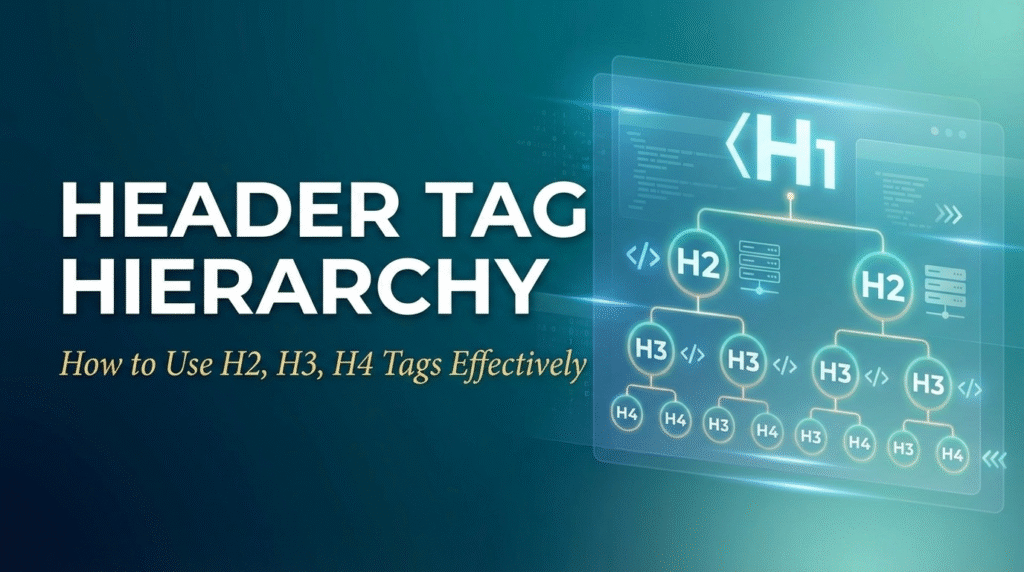
Proper header tag hierarchy serves as the backbone of well-structured, SEO-friendly content. Research from Microsoft and Google indicates that pages with logical heading structures receive better rankings and user engagement metrics compared to those with poor or missing hierarchy. Beyond SEO benefits, clear header structure improves content accessibility, readability, and helps users navigate long-form content more effectively.
This comprehensive guide explains how to implement header tag hierarchy that benefits both search engines and users. You’ll learn the proper structural relationships between different heading levels, content organization strategies, and how to use headers to improve your content’s topical authority and search visibility.
Understanding HTML Heading Structure
The Hierarchical System
HTML heading tags follow a logical hierarchy from H1 (most important) to H6 (least important). This structure mirrors traditional document organization, where main topics use primary headings and subtopics use progressively smaller headings. Search engines use this hierarchy to understand your content’s organization and relative importance of different sections.
Proper hierarchy means you shouldn’t skip heading levels. After an H1, use H2 for main sections, H3 for subsections under H2s, and H4 for further subdivisions under H3s. This logical flow helps both search engines and assistive technologies navigate your content structure effectively.
SEO Benefits of Proper Structure
Well-structured headings help search engines understand your content’s topical depth and organization. Google’s algorithms use heading hierarchy to determine content relevance, topical authority, and user experience quality. Pages with clear, logical heading structures often appear in featured snippets and other enhanced search results.
Research indicates that content with 3-4 heading levels typically performs better than content with only H1 and H2 tags or excessive heading levels that create confusion. This suggests an optimal balance between structure and simplicity.
Strategic H2 Tag Implementation
Main Section Organization
H2 tags should represent your content’s main sections or primary subtopics. These headings divide your content into logical, scannable chunks that address different aspects of your main topic. Each H2 should be substantial enough to warrant its own section, typically containing 200-500 words of supporting content.
Include relevant keywords in H2 tags naturally, focusing on semantic variations and related terms rather than exact-match repetition of your H1 keyword. This approach helps you target long-tail searches while maintaining natural readability.
Topic Clustering Strategy
Use H2 tags to create topic clusters that demonstrate comprehensive coverage of your subject. If your H1 focuses on “Email Marketing Automation,” your H2s might cover “Setup Strategies,” “Campaign Types,” “Performance Metrics,” and “Advanced Techniques.” This structure signals topical authority to search engines.
Each H2 section should provide enough detail to satisfy user intent for that subtopic while contributing to the overall value of your main topic. This comprehensive approach improves both user satisfaction and search engine evaluation of your content quality.
Effective H3 and H4 Implementation
Detailed Subsection Organization
H3 tags work best for breaking down H2 sections into specific, actionable components. If your H2 is “Email Campaign Types,” your H3s might include “Welcome Series,” “Product Announcements,” “Newsletter Campaigns,” and “Re-engagement Sequences.” This level of detail helps users find specific information quickly.
H4 tags provide further granularity when needed, but avoid excessive subdivision that can fragment your content and confuse readers. Most content works well with H1, H2, and H3 levels, using H4 only for complex topics requiring additional structure.
Long-tail Keyword Opportunities
H3 and H4 tags create excellent opportunities for targeting long-tail keywords and answering specific user questions. These detailed headings often match the natural language queries users type into search engines, particularly voice searches and question-based queries.
Consider user questions and search suggestions when crafting H3 and H4 headings. Tools like Answer the Public and Google’s People Also Ask can provide insights into specific questions your audience asks about subtopics within your main content theme.
Content Organization Best Practices
Logical Flow and Progression
Organize your header hierarchy to follow a logical progression that guides users through your content naturally. Start with foundational concepts in early H2 sections and progress toward more advanced or specific topics. This structure improves user experience and encourages longer engagement with your content.
Consider the user’s learning journey when organizing sections. What background information do they need first? What questions arise as they learn? How can you anticipate and address their needs through strategic heading organization?
Scannable Content Design
Design your heading structure to support content scanning, as research shows that 79% of web users scan rather than read every word. Your headings should allow users to quickly identify relevant sections and jump to information that meets their specific needs.
Use descriptive, benefit-focused headings that clearly communicate what users will learn in each section. Avoid clever or vague headings that don’t immediately convey value or relevance to your main topic.
Header Tags and Featured Snippets
Optimizing for Answer Boxes
Well-structured headings significantly improve your chances of appearing in featured snippets and answer boxes. Google often pulls content from pages with clear heading structures that directly answer user questions. Structure your H2 and H3 tags as questions when appropriate, followed by concise, definitive answers.
Research common questions in your industry and create heading structures that directly address these queries. FAQ-style sections using H3 tags for questions work particularly well for featured snippet optimization.
Voice Search Optimization
Header hierarchy plays a crucial role in voice search optimization, as voice queries often target specific information within longer content pieces. Clear, question-based headings help voice assistants identify and extract relevant information from your content.
Structure headings to match natural speech patterns and conversational queries. Instead of “ROI Calculation Methods,” consider “How to Calculate Email Marketing ROI” for better voice search alignment.
Common Header Hierarchy Mistakes
Skipping Heading Levels
Jumping from H1 directly to H3, or from H2 to H4, disrupts the logical content structure and can confuse both users and search engines. Always follow proper hierarchical progression to maintain clear content organization.
Overusing Header Tags
Using header tags too frequently can dilute their impact and make content appear fragmented. Not every paragraph needs a heading. Reserve header tags for genuinely important sections and subtopics that warrant structural emphasis.
Generic or Non-Descriptive Headings
Headings like “Introduction,” “Conclusion,” or “More Information” provide little SEO value and don’t help users understand content value. Make every heading descriptive and specific to the section’s actual content and benefits.
Keyword Stuffing in Headers
Overloading header tags with keywords makes them difficult to read and can appear manipulative to search engines. Focus on natural language that incorporates keywords organically while maintaining clarity and user value.
Key Takeaways
Follow proper hierarchy: Use heading levels in logical order (H1 → H2 → H3 → H4) without skipping levels to maintain clear content structure.
Create topic clusters: Organize H2 sections to demonstrate comprehensive coverage of your main topic, establishing topical authority.
Target long-tail keywords: Use H3 and H4 tags to target specific, question-based queries that align with natural language searches.
Support content scanning: Design heading structure to help users quickly identify and navigate to relevant information sections.
Optimize for featured snippets: Structure headings as questions followed by clear, concise answers to improve chances of appearing in enhanced search results.
Frequently Asked Questions
How many heading levels should I use in my content?
Most content works well with 2-3 heading levels (H1, H2, H3). Use H4 and beyond only when you have genuinely complex topics requiring additional subdivision. Too many heading levels can fragment your content and confuse readers, while too few may not provide adequate organization for comprehensive topics.
Should every H2 section have H3 subsections?
No, only use H3 tags when you have substantial subtopics that warrant further organization. Some H2 sections may be complete on their own, while others naturally divide into multiple H3 subsections. Let content structure guide heading decisions rather than following rigid formulas.
Can I use CSS to style headings without affecting SEO?
Yes, CSS styling doesn’t impact the SEO value of proper HTML heading structure. You can adjust fonts, colors, sizes, and other visual elements without affecting how search engines interpret your heading hierarchy. However, ensure your styling maintains clear visual hierarchy that matches your HTML structure.
How do heading tags affect page loading speed?
Proper HTML heading tags have minimal impact on page loading speed. The SEO and user experience benefits of well-structured headings far outweigh any negligible performance effects. Focus on creating clear, logical heading structures without worrying about speed implications.
Should I include keywords in every heading tag?
Include keywords naturally where they fit and add value, but don’t force keywords into every heading. Focus on creating descriptive, user-focused headings that organize your content logically. Natural keyword inclusion in relevant headings will occur organically when you write for user value.
How does heading structure affect mobile SEO?
Clear heading structure is especially important for mobile SEO because mobile users rely heavily on scanning and quick navigation. Well-organized headings help mobile users find relevant information quickly, improving engagement metrics that can positively impact search rankings.